
iPhone · iPad · Mac · Home Screen Widget
Expenses: Bill & Trip Splitter
Split any bill in seconds. Track every expense. Stay on budget — together or solo. Built for couples, roommates, travelers, and anyone who wants to know exactly where their money goes each month.
Overview
Expenses: Bill & Trip Splitter is a native app for iPhone, iPad, and Mac built around a home hub with six cards — not one endless spreadsheet — so you open the workflow that matches real life. Each area has its own list and detail screens; My Expenses rolls everything you choose into a single month view with metrics, optional income figures, insight cards, and swipeable donut charts with Pro.
On first launch, onboarding asks for your display name, primary currency, an optional name from Contacts, and whether to turn on iCloud private sync (Pro). You can tap Get started with a clean ledger or explore Go Premium from the same screen.
Data stays on your device by default. Receipt photos live in shared storage the widget can read. Optional sync uses Apple's private iCloud database for your Apple ID. Non–base-currency hints may use the public Frankfurter rate service — see Privacy policy for App Store disclosures.
Supports 158 world currencies with live exchange rates. This app does not show third-party ads.
Now on Mac
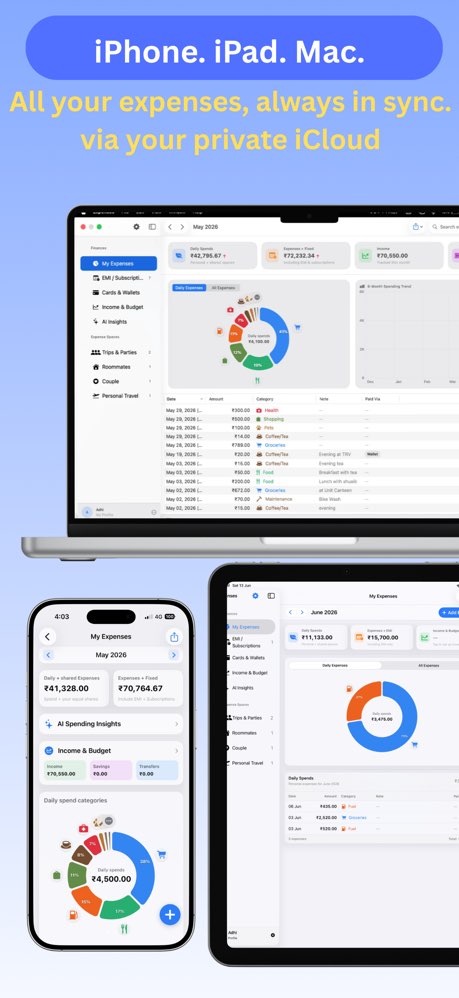
Expenses is a full native Mac app — not just an iPhone app running on a bigger screen. Add and edit expenses in floating panels that sit on top of your main window so the background stays visible and interactive at all times. Navigate with keyboard shortcuts. Enjoy Mac-native forms, layouts, and design throughout every screen.
iCloud keeps everything — expenses, trips, budgets, and EMIs — in sync across your iPhone, iPad, and Mac automatically. Your data is always up to date on every device you own.
Home hub (starting screen)
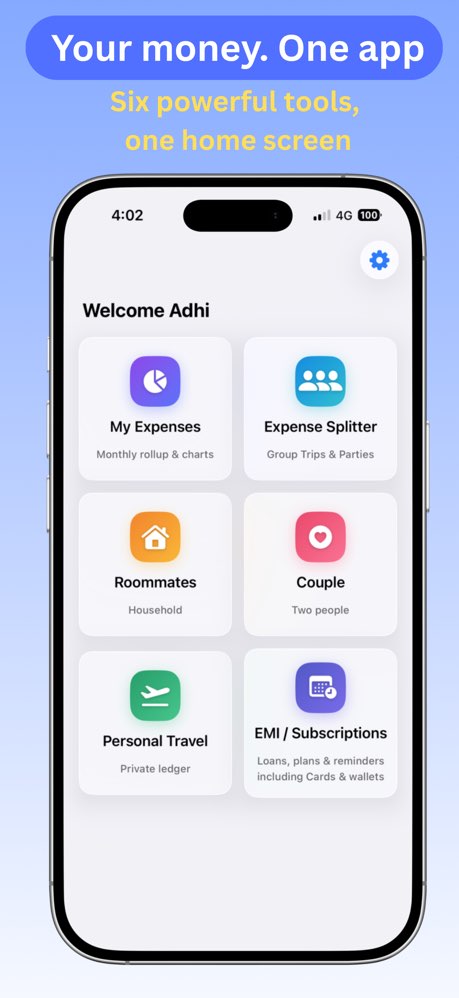
After onboarding you land on a welcome line and a two-column grid of tiles. Tap a tile to open that area; tap the gear (top-right) for Settings.
- My Expenses — Monthly rollup & charts
- Expense Splitter — Group trips & parties
- Roommates — Household
- Couple — Two people
- Personal Travel — Private ledger
- EMI / Subscriptions — Loans, plans & reminders
Core features by area
My Expenses (monthly rollup)
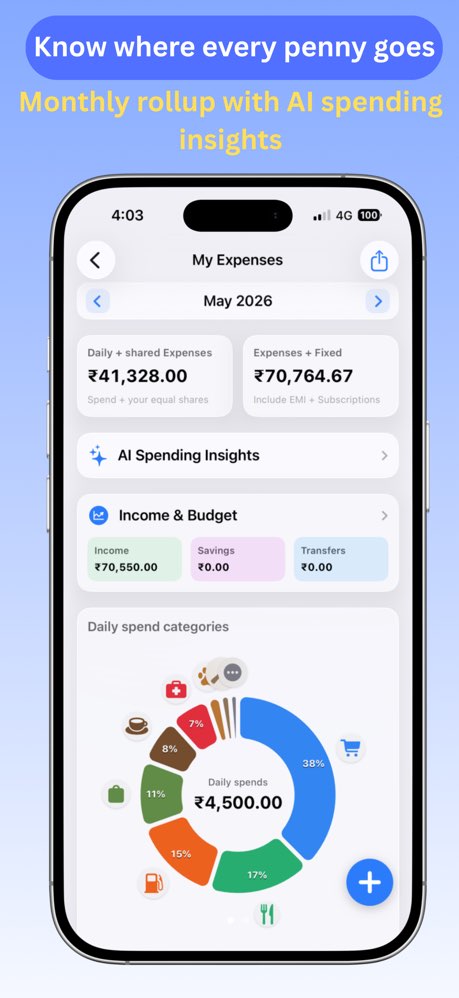
- Month navigator — Move between calendar months; totals and charts follow the selected month.
- Metric cards — Daily + shared Expenses (spend plus your equal shares from included spaces) and Expenses + EMI or Expenses + Fixed when subscriptions are included in monthly fixed costs (controlled in Settings).
- AI Spending Insights — Teaser insight cards for everyone; tap through to the full Spending Coach and Ask My Expenses Q&A with Pro (on-device intelligence where your device supports it).
- Income & Budget — Card opens salary, savings, and transfer rows for the month; optional income pills on the hub when enabled in Settings.
- Donut charts (Pro) — Swipe between Daily spend categories (personal cash-flow categories) and All expense sources (trips, roommates, couple, personal travel, misc, EMI, subscriptions).
- Cash flow list — Personal expenses grouped by day with search; floating + to add; support for category, note, paid-with (cash, card nicknames, mobile pay), voice entry, and receipts.
- Share & export (Pro) — Text summary or PDF for the selected month from the toolbar menu.
- Rollup inclusion for trips, roommates, couple, personal travel, personal misc, EMI in charts, subscriptions in monthly totals, and partner income can be tuned in Settings (see Learn — Settings).
Expense Splitter (trips & parties)
- List of trip/party spaces; add a space with name and optional dates.
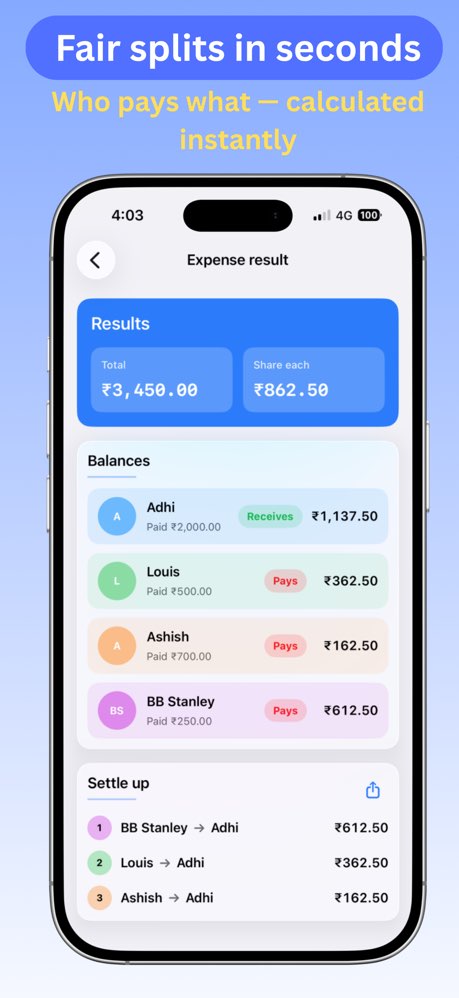
- Inside a space: people (names, optional contact photos), expenses (payer, amount, category, note, date, paid-with labels), running total, and Calculate for fair shares, balances, and a simplified settlement list.
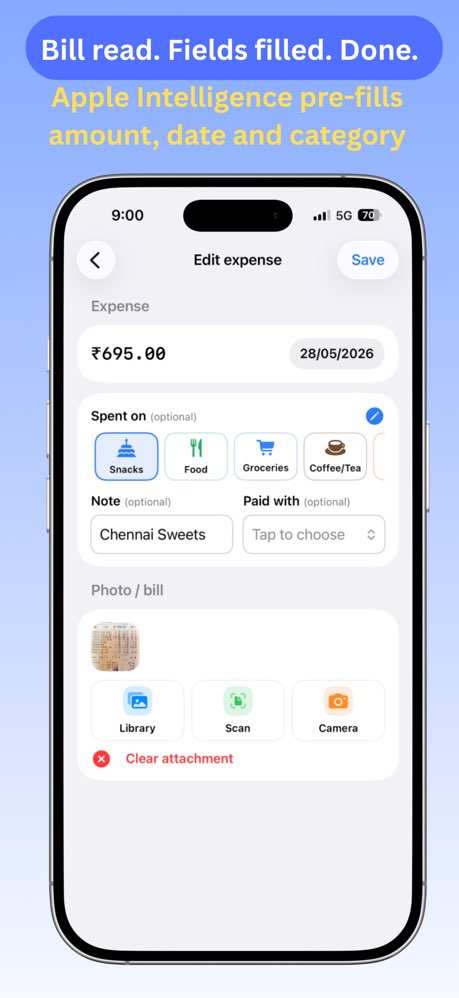
- Receipts — Camera or library attach; smart receipt review can pre-fill amount, date, and hints where Vision is available.
- iCloud sharing (Pro) — Share a trip with others through Apple's share UI; participants sync through CloudKit; leave or archive flows when membership changes.
- History — Saved calculation snapshots to revisit after the event.
- Export / import — Structured and spreadsheet-friendly backup of a space.
- Invites — Links and share sheets that open the app on another device.
Roommates (household)
- Same workspace pattern as trips, tuned for a shared home: property name, optional billing cycle day, participants, and household expenses.
- Optional iCloud sharing (Pro) to keep the household ledger in sync with roommates.
- Settle-up math and exports match trip/party behavior.
Couple (two people)
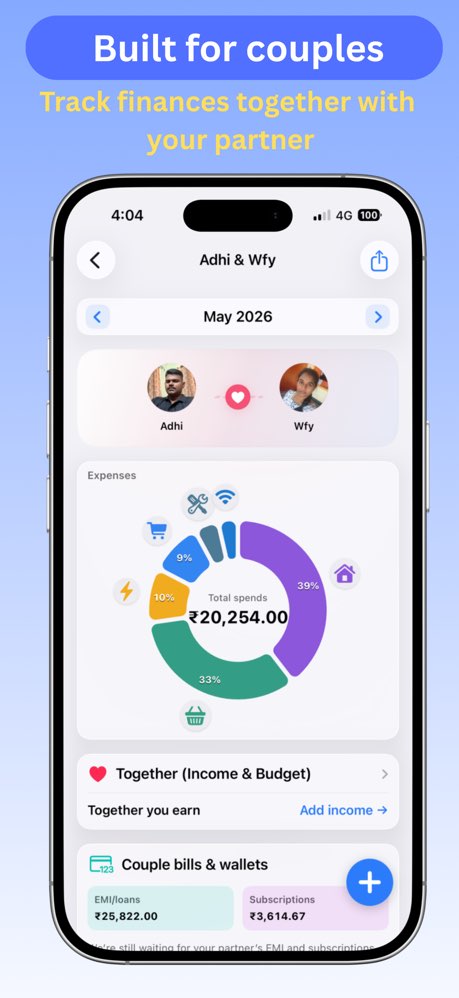
- Two-person space with split presets (for example 50/50), optional separate household vs personal ledger toggle, and per-person monthly income for income-weighted thinking where used.
- Shared bills synced in the couple space when iCloud sharing is on — partner EMI/subscription lines can surface on the couple EMI summary when that inclusion toggle is enabled.
- Couple Income & Budget — Household income rows, including partner-synced income when sharing is active.
- Invites lean on iCloud sharing for the couple space.
Personal Travel (private ledger)
- Private trip-style ledger that does not use the same cloud-share pattern as group trips — ideal for solo travel spending.
- Can still feed My Expenses when personal travel is included in rollup settings.
EMI / Subscriptions
The screen title stays EMI / Subscriptions; inside you switch segments with a control at the top:
- EMI/Loan — Track loans with amount, schedule, next due, closed state, optional receipts, and local reminders.
- Subscriptions — Recurring plans with the same reminder and receipt patterns; subscription insights summarize upcoming spend.
- Cards & wallets — Nickname-only profiles for credit cards and mobile pay (for example Venmo, PayPal) — never card numbers. Nicknames appear under Paid with when logging expenses across the app.
- Couple spaces can show a partner's shared EMI/subscription bills in the list when couple summary inclusion is on.
Receipts
- JPEG receipts stored in shared on-device storage and linked from personal expenses, shared expenses, and EMI records.
- Smart Vision-based pre-filling reads the amount, date, and merchant name automatically from scanned receipts.
Home Screen widget
- Shows the current month title, cash paid, totals with EMI/subscription breakdown, and income / savings / remaining when you use income details — updated from the main app.
- Requires Pro; without Pro the widget shows a premium-required message.
Siri, Shortcuts, and voice
- Quick expense — Open the app for voice capture.
- Natural expense — Parse spoken or typed phrasing into a personal expense.
- Log expense — Add spending for a chosen category.
- Trip expense — Log into a shared trip flow.
- Log EMI — Quick entry for a loan line.
- Settings can auto-save voice expenses or leave fields filled for your review.
Settings
- Profile — Display name, photo (picker + crop), base currency.
- Premium — Go Premium, restore purchases, manage subscription; active status when entitled.
- Income & Budget — Show income details on My Expenses.
- Appearance — Light / dark / system and accent color.
- Feedback — Haptics and sounds.
- Voice expense entry — Auto-save after Siri parsing.
- Data sync — iCloud private sync toggle (Pro to enable).
- Date format — Regional date display preference.
- About — Version, Send Feedback, contact, privacy, and terms links.
Free vs Premium
Free includes the home hub, shared-space splitting, My Expenses rollups (metrics, cash-flow list, income card, AI insight teasers), EMI / subscriptions / cards & wallets, receipts, space export/import, and Shortcuts — with a limit of three new expense entries per calendar day (personal or shared) unless you upgrade.
Expenses Premium unlocks the full AI Spending Insights coach, donut charts, month summary share/PDF, iCloud private sync, iCloud sharing for eligible shared spaces, the Home Screen widget, receipt scanning, and unlimited daily expense logging. Restore and subscription management live in Settings.
Pricing
Free to start, with an optional Premium unlock available as Monthly or Yearly subscriptions (each with a 14-day free trial) or a one-time Lifetime purchase. All purchases are processed by Apple — see current pricing for your region on the App Store listing or in the app's paywall. Restore purchases any time from Settings.
Permissions
Where features need them: Camera and Photo Library (receipts and avatar), Contacts (names), Microphone and Speech Recognition (voice entry), Notifications (EMI/subscription reminders), and Siri.
Support & trust
Use Send feedback in Settings, email support@kavniktech.com, or our contact page. Legal detail: app privacy policy and terms of use.
For step-by-step flows, see Learn how to use.
Also available: Time & Date Calc - Aviation (iOS)